 Today's Deal
Amazon Deals
Today's Deal
Amazon Deals
 Today's Deal
Amazon Deals
Today's Deal
Amazon Deals
 popular
 8
8
Views Today
 1
1
Favorites Today





Business Name: Hannto Technology Co., Ltd

Business Address: 盛荣路88弄1号704室, 上海, 自由贸易试验区, 上海, 200120, CN

Business Size: Micro
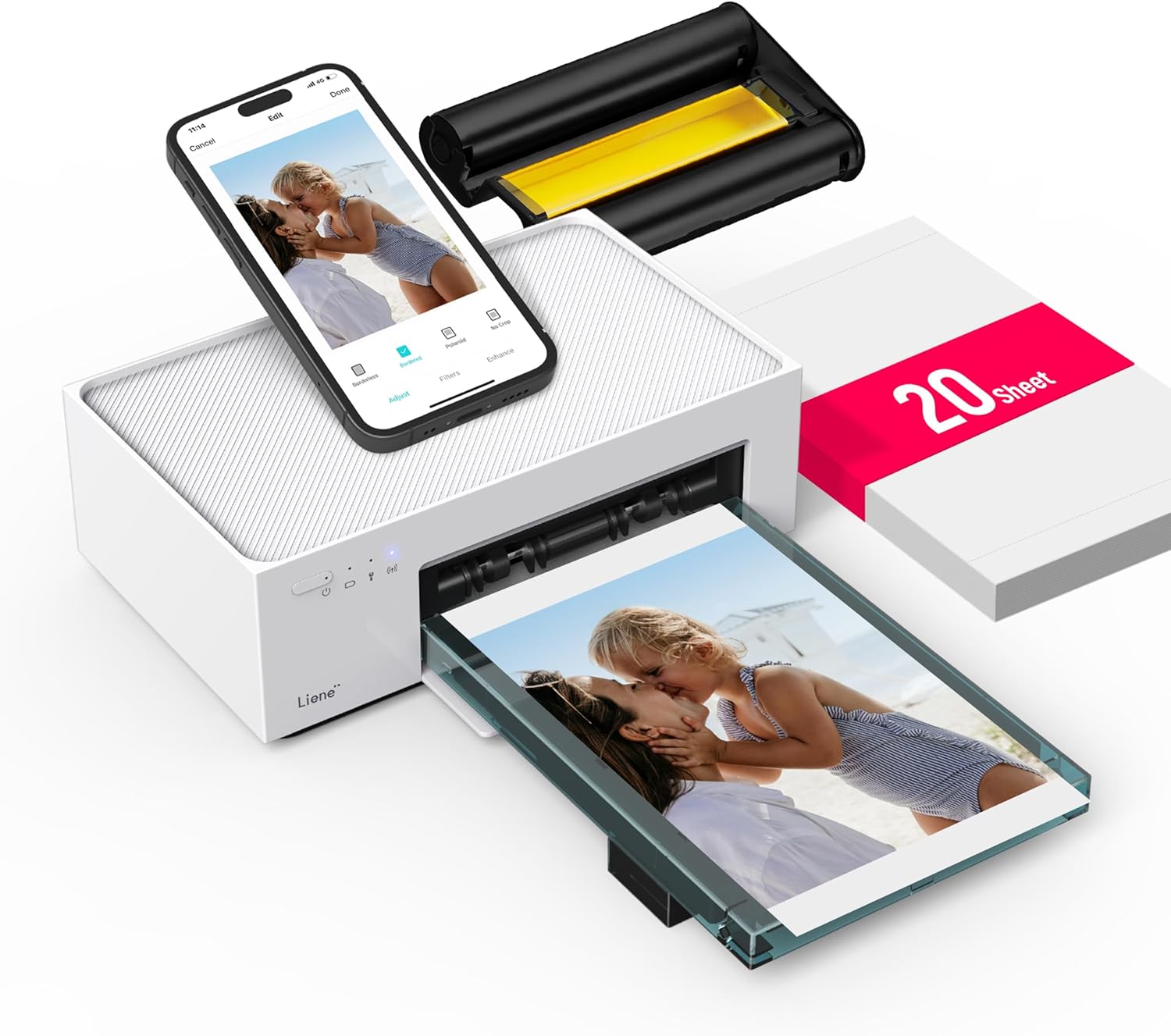
The Liene 4x6'' Photo Printer is an exclusive instant photo printer that brings convenience and high-quality printing to your fingertips. Designed with Wi-Fi connectivity, this printer seamlessly connects with both iPhone and Android devices, making it a versatile choice for personal and professional use. The printer's efficient thermal dye sublimation technology ensures vibrant, full-color prints, while its affordability and included 20 sheets of photo paper make it a budget-friendly option for anyone looking to bring their memories to life at home.
Choosing the Liene Photo Printer offers numerous benefits that cater to a variety of users. Its exceptional print quality is frequently praised by users, ensuring each photo comes out crisp and vibrant. The ease of use is another significant advantage, with a straightforward setup process and intuitive design that allows anyone to start printing quickly. The wireless connectivity ensures that you can print directly from your smartphone, providing flexibility and saving time. Additionally, the printer’s compact and durable construction makes it a reliable option for prolonged use.
At a price of $107.94, the Liene Photo Printer offers great value for those seeking a reliable and high-quality photo printing solution. Unlike many other photo printers in the same price range, this printer does not compromise on features. It includes 20 sheets of photo paper, adding to its cost-effectiveness. For the quality, ease of use, and convenience it offers, many users find the investment worthwhile, highlighting its role as a valuable addition to any home or office setup.
Liene distinguishes itself from competitors through its combination of user-friendly features and exceptional performance. Its Wi-Fi connectivity allows seamless integration with mobile devices, unlike many traditional printers that require cumbersome cables. The efficient thermal dye sublimation technology utilized by Liene ensures that each photo is of professional-grade quality, rivaling that of commercial printing services. Numerous user reviews emphasize the printer's reliability and ease of setup, making it a preferred choice over others that might offer less intuitive user experiences.
The Liene Photo Printer is packed with features that cater to modern printing needs. Key features include Wi-Fi connectivity, allowing you to print from both iPhone and Android devices effortlessly. Its compact design integrates a high-quality thermal dye sublimation process, which produces vivid and durable prints. The printer includes 20 sheets of photo paper, so you can start printing right away, while the efficient printing technology ensures each print is consistent and vibrant.
Setting up the Liene Photo Printer is a straightforward process. Start by downloading the Liene app, then connect the printer to your Wi-Fi network. The app guides you through setting up and establishing a connection with your smartphone. Once the app is installed, select the photos you wish to print and follow the prompts. It's important to ensure your phone is compatible and properly synced with the app to access all your photos. If you encounter issues with photos not showing up, as noted in a user review, editing the photos on your phone might help them become available for printing.
The Liene Photo Printer boasts compatibility with a wide range of devices thanks to its Wi-Fi capabilities. It can easily connect with both iPhone and Android devices, providing broad access for most users. To ensure a seamless experience, make sure your device is updated and that the Liene app is properly installed. The printer is designed to work across most modern smartphones, making it a convenient tool for photo enthusiasts looking to print directly from their mobile gallery.
The Liene Photo Printer is ideal for anyone who frequently needs prints, whether for personal memories or professional projects. It's perfect for capturing special moments at family gatherings, vacations, or events where instant prints are desired. Given its ease of use and quick processing time, it can also serve as a reliable tool for small business owners needing quick and quality prints for presentations or portfolios.
The Liene Photo Printer is available for purchase through various online retailers, including major platforms like Amazon. Checking for deals or discounts can help you obtain it at a competitive price. It is also a good idea to check local electronics or office supply stores, which might carry this model in stock.
In addition to the initial purchase price of $107.94, operating the Liene Photo Printer involves purchasing replacement ink and photo paper. It's essential to consider these ongoing costs when making your decision. The affordability of these supplies compared to commercial printing costs makes the Liene printer a cost-effective solution over time for those who print photos regularly.
The Liene Photo Printer comes with a starter package that includes 20 sheets of photo paper. This allows you to immediately begin printing and experiencing the quality of the prints the device can produce. Additional photo paper and ink will need to be purchased separately once the initial supply is depleted.
The Liene Photo Printer is often considered one of the top choices by users who value quality and ease of use. Its Wi-Fi connectivity, high-quality prints, and simple interface make it a strong contender among other photo printers. For those seeking reliability alongside high-quality performance, the Liene printer consistently receives high praise and recommendations from satisfied customers.
User reviews highlight several strengths of the Liene Photo Printer, including its high print quality and friendly user interface. Many users attest to its reliable performance for both personal and professional projects, emphasizing its value for money. Some users have encountered connectivity issues, specifically with the app not displaying all photos, but have also noted that customer service eventually provided assistance. Overall, the reviews suggest the printer is well-regarded, with most issues being surmountable with a bit of troubleshooting or support.
Common questions about the Liene Photo Printer often relate to its setup and operation. Users frequently inquire about compatibility with different smartphone models, how to resolve connectivity issues, and where to purchase replacement supplies like ink and photo paper. It's advised to consult the user manual and official FAQs for troubleshooting but also reach out to customer service if needed.
In conclusion, the Liene 4x6'' Photo Printer offers a compelling combination of convenience, quality, and affordability. With its seamless Wi-Fi connectivity, excellent print quality, and straightforward setup, it stands out as a top choice for anyone in need of a personal photo printer. Despite occasional connectivity hiccups, the overall performance and value provided by the Liene Photo Printer make it an excellent investment, suitable for a variety of printing needs.
The Liene Photo Printer significantly enhances your printing experience by providing an easy-to-use and reliable solution for high-quality photos at home. Its affordability combined with professional print results ensures that you can cherish your memories with vivid clarity without recurring trips to a print shop. With the ability to print directly from your smartphone, it transforms the way you manage and produce your photo albums, turning a digital stream of images into tangible keepsakes effortlessly.
Only In TestMarket
Average rating
 5
5
11
4
4
3
0
2
0
1
0


 Facebook
 Twitter
 Linkedin
 Reddit
 Pinterest


Emily Scott
Jun 17, 2025
After much research, I opted for the Liene 4x6'' Photo Printer. Its dye sublimation method delivers vibrant and professional-looking prints. I appreciate the simplicity of the design, which makes it easy to use for first-timers like me.
The pricing on Amazon was competitive, and I was pleased with the packaging and timely delivery. This printer is a worthwhile investment for anyone frequently printing photos from home.
Shipping
Item Quality
Customer Service
Packaging
Henry Morgan
Jun 17, 2025
This printer exceeded my expectations in some ways, especially in terms of print quality. The photos come out crisp and vivid. However, the device felt a bit glitchy when I first set it up with my phone's app—a minor inconvenience.
The packaging was compact and sturdy, ensuring no damage during delivery. Overall, it's a reliable device that's worth considering for home use.
Shipping
Item Quality
Customer Service
Packaging
Michael Rivera
Jun 17, 2025
Enjoying my time with the Liene Printer, which prints my favorite photos with ease. I found the setup straightforward using Wi-Fi with my Apple devices.
Each photo takes less than a minute, which is perfect for my fast-paced lifestyle. The cost is reasonable, given the quality of the prints. However, it does require regular refills of paper and ink packs, so keep that in mind.
Shipping
Item Quality
Customer Service
Packaging
Michael Moore
Jun 17, 2025
This little printer is great for everyday photo printing. The prints are professional-grade, and the printer itself is easy to operate.
I had some struggles initially with the connection between the printer and my Android phone, but after updating the app, it worked fine. The dye sublimation method ensures longer-lasting prints. Satisfied with my purchase and would likely buy more paper soon.
Shipping
Item Quality
Customer Service
Packaging
Andrew Allen
Jun 17, 2025
I recently purchased the Liene Photo Printer and am pleased with the quality of output it delivers. The process of printing is straightforward, especially with the accompanying app. I did encounter a hiccup where all my photos weren't visible in the app, but updating the app sorted it out. Beyond that, every print has been crisp, and the colors are vibrant.
A smart buy for preserving memories!
Shipping
Item Quality
Customer Service
Packaging
William Scott
Jun 11, 2025
The Liene 4x6'' Photo Printer is quite efficient for home use. Compact and easy to set up, it doesn't take much room and delivers rich, colorful prints quickly. I did face an initial glitch while connecting it to my phone, but a quick reload of the app did the trick.
Packaging was neat, and delivery was fast. A handy tool for anyone looking to keep their photo collection physical.
Shipping
Item Quality
Customer Service
Packaging
William Scott
Jun 15, 2025
Great little printer that's perfect for my needs. Setup was easy and the design is simple, fitting nicely on my limited desk space. The prints are of impressive quality, capturing all the details and colors accurately.
The instant drying feature is a bonus, allowing me to immediately display the photos. Ordering extra paper and ink wasn't very expensive, making it an economical choice for regular users.
Shipping
Item Quality
Customer Service
Packaging
Lucy Evans
Jun 11, 2025
I've been using the Liene printer for a few weeks now, and overall, it's a good choice for home photo printing. The setup process through Wi-Fi was mostly smooth, although a bit tricky on my older Android phone. The prints themselves are rich and vibrant, with no smudging.
The convenience of printing directly from my phone is a huge plus, saving me time compared to getting prints from a store. Definitely worth considering.
Shipping
Item Quality
Customer Service
Packaging
James Cooper
Jun 15, 2025
This photo printer is a mixed bag for me. The print quality is undeniably excellent, producing vibrant and sharp photos.
However, I'm not thrilled with having to work around the app limitations on my Android device. Some photos weren't showing up until I edited them. Customer service was a bit slow to respond but eventually helpful.
If you can get past the app quirkiness, it's a solid photo printer.
Shipping
Item Quality
Customer Service
Packaging
Henry Adams
Jun 14, 2025
I love using the Liene 4x6'' Exclusive Instant Printer for printing memories at home. The print quality is excellent, and the prints come out quickly. I was a bit hesitant about thermal dye sublimation at first, but the results are very professional.
The packaging featured all necessary components, and the order process was smooth. A reliable choice for anyone looking to print quality photos easily.
Shipping
Item Quality
Customer Service
Packaging
Emma Brooks
Jun 13, 2025
The Liene Photo Printer has been a reliable companion for my photography projects. The thermal dye sublimation process ensures each print is of high quality, with accurate colors and crisp details. I've noticed that it dries faster than inkjet prints, making it convenient for immediate use.
I had a slight issue with the initial setup on my Android device, but a quick restart of the app fixed it. Highly satisfied with this purchase!
Shipping
Item Quality
Customer Service
Packaging
John Smith
Jun 17, 2025
This Liene printer is good if you're looking for a budget-friendly option to print photos at home. The Wi-Fi setup was user-friendly, and the printing process is fairly quiet. However, there were some connectivity issues initially which needed adjustment in the app settings.
Once resolved, the prints were vivid and detailed. It's a practical buy for occasional photo printing needs.
Shipping
Item Quality
Customer Service
Packaging
Charlotte Stewart
Jun 11, 2025
After comparing several options, I chose the Liene Instant Printer for its versatility and price. While the setup took a bit longer than expected due to a few connectivity hiccups, the print quality makes up for it. Each photo is printed with rich color accuracy and depth.
I've mostly used it for personal use, but its potential for small professional projects is promising. Ordering and packaging were seamless, making the entire experience delightful.
Shipping
Item Quality
Customer Service
Packaging
Henry Adams
Jun 14, 2025
I was eager to try out the Liene Photo Printer after reading the positive reviews. The packaging was clean and minimalistic, with clear instructions.
I'm not tech-savvy, but the setup was a breeze. The prints are sharp, colorful, and dry instantly. I love the fact that I can print directly from my phone without hassle.
It's a fantastic value for the price and has made printing photos a joy rather than a chore.
Shipping
Item Quality
Customer Service
Packaging
William Scott
Jun 11, 2025
Recommended
The Liene 4x6'' Photo Printer is a delightful addition to my home office. The setup was straightforward, and the Wi-Fi connectivity works like a charm with both my iPhone and Android devices. The photo quality is truly top-notch. I appreciate the thermal dye sublimation technology, which produces vibrant and detailed prints.
The printer is compact yet efficient, perfect for home use. Highly recommend it for anyone looking to print stunning photos quickly!
Shipping
Item Quality
Customer Service
Packaging