 Today's Deal
Amazon Deals
Today's Deal
Amazon Deals
 Today's Deal
Amazon Deals
Today's Deal
Amazon Deals
 popular
 2
2
Views Today
 1
1
Favorites Today





Business Name: Prinics Co., Ltd

Business Address: 228-92 Saneop Road 155th street, Suwon-Si, Gyeonggi-Do, 16648, KR, 197-50, Saneop-ro 156beon-gil, Gwonseon-gu, Suwon-si, Gyeonggi-do, 16648, KR

Business Size: Micro
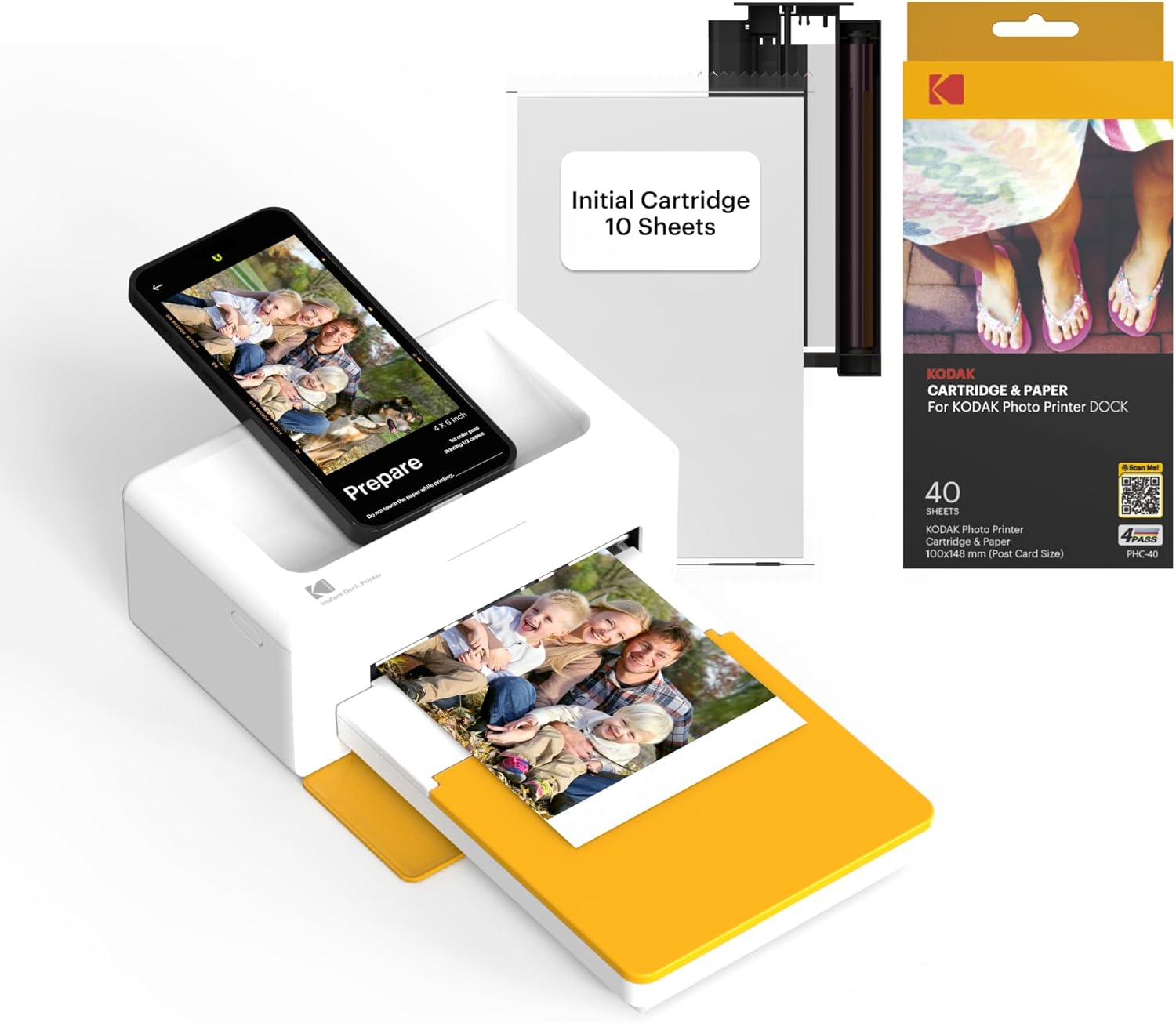
The KODAK Dock Plus 4PASS Instant Photo Printer is a unique, high-quality photo printing device. Designed to be both user-friendly and efficient, this printer offers the perfect solution for those who want to bring their digital memories to life in vibrant printed photos.
This printer brings a multitude of benefits to users. It offers instant printing through its 4PASS technology, which ensures high-quality, vibrant photos. The device is also easy to set up and use, making it accessible to people of all tech levels. Additionally, the photo paper bundle ensures you’re stocked up and ready to print, right out of the box. Users have noted the joy of transforming digital memories into physical photos, which can be cherished for years.
For its price of $152.99, the KODAK Dock Plus 4PASS stands out as budget-friendly compared to other high-quality photo printers. It includes 90 sheets of photo paper, which adds incredible value to the package. This affordability makes it accessible for families, hobbyists, and anyone looking to preserve their memories without breaking the bank.
Choosing the KODAK Dock Plus 4PASS Instant Photo Printer means opting for convenience, quality, and affordability. This printer utilizes advanced dye-sublimation printing technology that ensures vibrant, high-resolution photos. It’s compact and easy to use, making it a great addition to any household or small office. Users have also praised its ability to connect wirelessly, providing seamless printing from smartphones and other devices.
When you purchase the KODAK Dock Plus 4PASS Instant Photo Printer, you receive an initial 10 sheets of photo paper to get you started. Additionally, the bundle includes an extra 80 sheets, giving you a total of 90 sheets. This comprehensive package ensures you can start printing your favorite photos immediately and continue to do so for quite some time.
Using the KODAK Dock Plus 4PASS Instant Photo Printer is straightforward. Start by downloading the compatible app to your smartphone. Next, connect the printer to your device via Bluetooth or USB. Load the printer with photo paper and you're ready to print. The app provides easy navigation to select, edit, and print your desired photos, ensuring hassle-free operation.
Features that stand out include its compact design, ease of use, and high-quality 4PASS printing technology. Users appreciate the ability to print directly from their smartphones. The included photo paper adds convenience, and the vibrant, sharp results are a significant highlight. Users also note its capacity to bring digital memories to life, creating tangible keepsakes.
The best time to use this photo printer is during family events, vacations, and special occasions. It helps promptly print and share photos, keeping cherished moments alive. It’s also ideal for creating photo albums, scrapbooks, or even just decorating your space with your favorite memories.
The KODAK Dock Plus 4PASS Instant Photo Printer is compact, allowing it to fit seamlessly anywhere in your home or office. Its wireless capabilities mean it doesn’t need to be tethered to a computer, giving you the flexibility to set it up in your living room, study, or even a dedicated photo corner.
The KODAK Dock Plus 4PASS Instant Photo Printer is priced at $152.99. This cost includes the printer itself, an initial 10 sheets of photo paper, and an additional 80 sheets of photo paper. For the quality and convenience it offers, this price point is quite reasonable.
With the 90 sheets of photo paper included in the package, you can print up to 90 photos initially. This provides ample printing capability before needing to purchase additional photo paper.
The best uses for this printer include creating photo albums, scrapbooks, and personalized gifts. It’s also perfect for crafting projects and home decor. People have found it especially useful for documenting life’s special moments, such as family gatherings and holidays.
The KODAK Dock Plus 4PASS Instant Photo Printer performs exceptionally well in delivering quality prints swiftly and efficiently. Users have highlighted its reliable performance and the vibrancy of the printed photos. Though a few users noted some color discrepancies, the overall consensus is that it provides excellent value for its price point.
Common questions include inquiries about photo quality, ease of use, and connectivity options. Many users ask if the printer can handle different sizes of photo paper (it typically does the 4x6 size), whether it can print wirelessly (yes, via Bluetooth), and how quickly the prints dry (almost immediately).
In conclusion, the KODAK Dock Plus 4PASS Instant Photo Printer offers an excellent balance of quality, ease of use, and affordability. For those looking to transform their digital photo collections into tangible memories, this printer is a worthwhile investment. It provides the joy of physical photos while being convenient and budget-friendly.
The KODAK Dock Plus 4PASS Instant Photo Printer is a great addition to any household or small office. It delivers on its promise of high-quality prints, ease of use, and good value for money. Whether for personal use or gifting, this printer will help you cherish and share your fondest memories in a physical form.
Only In TestMarket
Average rating
 5
5
13
4
2
3
0
2
0
1
0


 Facebook
 Twitter
 Linkedin
 Reddit
 + Initial 10 Sheets + 40 Sheets Bundle 50 Sheets Bundle&media=https://testmarket.io/storage/deal/amazon/2026-01-02/079939d994a5a130882c3a64e27ec7c6.jpg) Pinterest
Pinterest


David Jenkins
Oct 06, 2024
I recently bought the Kodak Dock Plus 4PASS Instant Photo Printer to create a physical photo collection, and it’s been a pleasant experience. It was packed securely and the setup process was simple. Linking it to my phone was smooth, and printing photos is easy.
The photo quality is decent for casual prints; some images had slight color shifts. Having the extra sheets in the bundle is great for extended use. Overall, I’m happy with this purchase and the price point.
Shipping
Item Quality
Customer Service
Packaging
Harper Lee
Oct 05, 2024
The Kodak Dock Plus 4PASS is a good addition to our home office. It was easy to set up, and the design is pretty sleek. Printing photos directly from the phone is convenient, although the image quality could be better. Sometimes the colors don’t match the originals perfectly.
However, for its price, it performs adequately. The additional sheets are a great bonus and make it economical. It's useful for quick and easy printing needs.
Shipping
Item Quality
Customer Service
Packaging
Dylan Ramirez
Oct 09, 2024
Recommended
We have been using the Kodak Dock Plus 4PASS Instant Photo Printer for our photo wall and it has been working well. The printer and the extra sheets came well-packaged. Setting it up was easy, and the user interface is intuitive. Some prints have slight color differences, but the speed and convenience make up for it.
It’s a fun way to get photos out of the phone and into physical albums. I would certainly recommend it to others looking for an affordable printer.
Shipping
Item Quality
Customer Service
Packaging
Lucas Stewart
Oct 10, 2024
Got the Kodak Dock Plus 4PASS for my daughter's scrapbook project. The initial setup was quick, and it paired smoothly with her phone. The prints are of reasonable quality—good for what we need, but not perfect. I appreciate the extra sheets included in the bundle, which kept us going without needing immediate refills.
Overall, it’s a useful tool for casual photo printing and memories. Satisfied with this purchase.
Shipping
Item Quality
Customer Service
Packaging
Mia Adams
Oct 09, 2024
The Kodak Dock Plus 4PASS printer has made it so easy to print photos straight from my phone. The entire order and unpacking process was straightforward. Print quality is decent, but not professional.
Some colors come out slightly different, but it's not a deal-breaker. The speed of printing is impressive and the package with extra sheets makes it economical. A solid choice for anyone needing an affordable home printer.
Shipping
Item Quality
Customer Service
Packaging
Charlotte Stewart
Oct 03, 2024
Recommended
I ordered the Kodak Dock Plus 4PASS Instant Photo Printer and it has been a fun gadget to use. The package included more than enough sheets to get started and keep printing for a while. Setting it up was hassle-free and connecting it to my phone was simple. While the print quality is satisfactory, professional photographers might notice some imperfections.
That being said, it’s great for family photos and moments. I am happy with this purchase and would recommend it for casual printing.
Shipping
Item Quality
Customer Service
Packaging
Logan Powell
Oct 10, 2024
Having the Kodak Dock Plus 4PASS printer around has brought back the joy of physical photos. The setup was quick and easy, and I was printing photos in no time. The photo quality is decent; there’s some color inconsistency here and there, but it’s good enough for home use.
The additional sheets in the bundle are a good value. For its price, it’s a handy device to have if you want to keep physical copies of your digital memories.
Shipping
Item Quality
Customer Service
Packaging
Anthony Wright
Oct 09, 2024
Recommended
We got the Kodak Dock Plus 4PASS printer to print photos for a scrapbook and it has been pretty handy. The packaging was good and the instructions were clear and easy to follow. The quality of the prints is nice, although they sometimes deviate slightly in color. The printer is quick, and we’ve enjoyed using it to create memories.
The extra 90 sheets in the bundle were a good deal and saved us from having to buy more paper soon after. Definitely recommended for casual photo printing.
Shipping
Item Quality
Customer Service
Packaging
Oliver Ross
Oct 06, 2024
Using the Kodak Dock Plus 4PASS Instant Photo Printer has been a nice experience. The order process was smooth and the delivery was prompt. The printer itself is compact and didn’t take long to set up. It connects easily with my phone.
The print quality is good but not outstanding – some photos have color shifts. Nevertheless, it’s useful for printing everyday snaps and family moments. The bonus of an extra set of sheets in the bundle makes it economical. Overall, a good purchase for home use.
Shipping
Item Quality
Customer Service
Packaging
Abigail Kelly
Oct 10, 2024
The Kodak Dock Plus 4PASS printer is very easy to use, even for someone who isn’t tech-savvy. It printed my photos quickly, though the resolution isn’t professional-grade. The photo quality was acceptable and good for creating a physical memory book.
The additional sheets included in the bundle are handy. In summary, it’s a useful device for those who wish to print photos at home without expecting professional-level prints.
Shipping
Item Quality
Customer Service
Packaging
Logan Powell
Oct 06, 2024
I bought the Kodak Dock Plus 4PASS printer for preserving some precious moments with my family. The setup was user-friendly and it paired effortlessly with my phone. I appreciate the bundle with additional sheets, which keeps the cost effective in the long run.
Print quality is good but occasionally not perfect, with slight color variances. It’s compact and stylish, making it a lovely addition to my desk. If you’re looking for an affordable and easy way to print photos at home, this is a solid choice.
Shipping
Item Quality
Customer Service
Packaging
Logan Powell
Oct 03, 2024
This Kodak Dock Plus 4PASS Printer was a gift, and it has been a delightful addition to our home. The packaging was sleek and protected the device well. It's a straightforward setup and the process of printing is almost fun.
The print quality isn’t on par with professional prints, but for home use, it’s perfectly fine. The affordability of additional sheets is a plus too. It’s a joy to see photos printed instantly and share them around.
A good buy for anyone looking to print memories from their phone.
Shipping
Item Quality
Customer Service
Packaging
Charlotte Stewart
Oct 09, 2024
I got this Kodak printer primarily to print photos of my travels and it has been pretty reliable. The whole package, including the extra paper, made it a good buy. Setup was almost too easy and I was printing within minutes.
The print quality is decent and reminds me of times when we used to print photos regularly. The colors sometimes look a bit different from what I see on my phone's screen, but it's nothing that drastic. Overall, a handy gadget to have for those who like physical copies of their digital photos.
Shipping
Item Quality
Customer Service
Packaging
Sofia Ross
Oct 06, 2024
The KODAK Dock Plus 4PASS Instant Photo Printer is great for quick and easy photo prints from your phone. The initial setup was a breeze, and I loved how user-friendly it is. While it won't replace professional-grade printers, it serves the purpose of printing memories stored on your phone quite well. The included 10 sheets and the affordable 90 sheets bundle made it a good deal.
The prints are of variable quality – some came out excellent, while others had slight color discrepancies. However, for its price, it performed exceptionally. Would buy again.
Shipping
Item Quality
Customer Service
Packaging
Luke Kim
Oct 09, 2024
Recommended
I purchased the KODAK Dock Plus 4PASS Instant Photo Printer to start printing out some family memories from my phone, and it has been quite satisfactory so far. The setup was straightforward and the instructions were clear. I particularly like the compact design which fits nicely on my desk without taking up too much space. As for the print quality, it's decent but not extraordinary.
The colors can be a bit off compared to professional prints, but for everyday use, it works just fine. The printing speed is also good, quick enough for me to print several photos in a short time. I am pleased overall and would recommend it to anyone who needs a budget-friendly photo printer.
Shipping
Item Quality
Customer Service
Packaging